







Dear Meeting Leaders and Hosts, Intergroup and Service Board Chairs, Meeting and Service Board Treasurers, Trusted Servants, and OA Virtual Region Members:
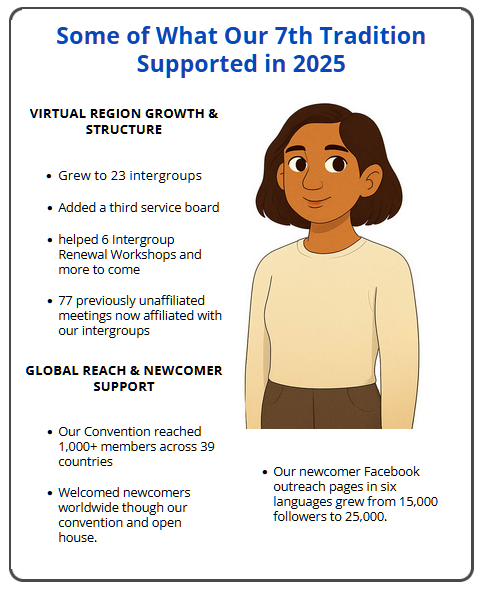
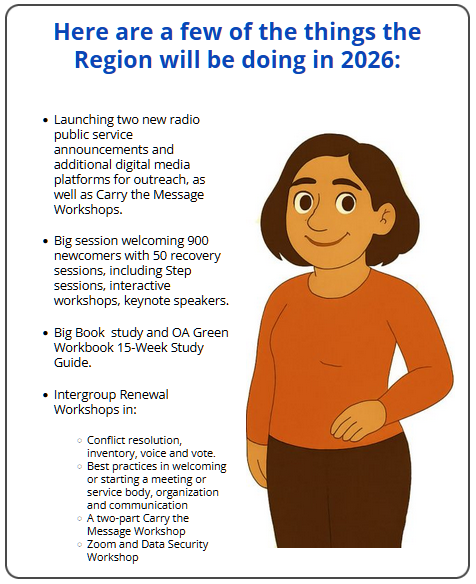
Introducing the First-Ever Virtual Region Annual Appeal Slideshow. For the first time, the Virtual Region is sharing a narrated Annual Appeal slideshow that may be used in OA meetings to support the 7th Tradition and to increase awareness of Virtual Region service opportunities.
| |
 |  |
In any meeting where video can be accessed (for example, a Zoom meeting), groups may share the slideshow:
-
- During the 7th Tradition announcement
- During business meetings
- At any point the meeting format allows
Important: The QR Code Is Timed on Purpose The slideshow concludes with a QR code that remains on-screen for several seconds so members have enough time to scan it and make a contribution if they wish. This is intentional, not an error in the video.
-
- No pausing is required .
- Simply allow the video to play fully to the end, so members can use the QR code.
If video isn’t possible, leaders may instead:
-
- Play audio only
- Share the Annual Appeal link
- Share the link in meeting
- outside the meeting (email, WhatsApp, website, etc.)
Optional Links You May Share with Members:
Link A — 2024 Use of Funds Summary
Link B — Assembly Binder: Budget + Reports
Link C — Service Opportunities in the Virtual Region
How to Screen-Share the Slideshow in Zoom: – Please test in advance when possible.
CLICK HERE for A Tutorial
on how to a share slide show/audio on Zoom!
Windows / Mac (Recommended)
-
- click Share Screen
- Select the slideshow window.
- Check Share Computer Sound.
- Click Share, then press Play.
Android (Varies by device — testing recommended)
-
- Share → Screen.
- Tap Start Now.
- Enable Share Device Sound.
- Play slideshow.
Chromebook
-
- Share → Chrome Tab.
- Turn ON Share Tab Audio.
- Play slideshow.
IPhone/IPad
-
- Share Content → Files → Select Video.
- Zoom will play narration + slides automatically.
Phone-Only & Non-Real-Time Meetings:
For phone-only meetings or email/chat-based formats:
– Play audio only when possible.
– Share the video link for independent viewing.
– Include the 7th Tradition/Annual Appeal link so members can contribute.
Contribution Details:
Meetings, Intergroups, Service boards, and individual members may contribute.
When contributing on behalf of a meeting or service entity, please include your OA Meeting/Service ID Number.
For Zoom Meetings, please share these links:
With gratitude for your service and generosity,
Overeaters Anonymous — Virtual Region #09911.
Together we carry the message — one meeting at a time.
SOURCE: OA VIRTUAL REGION
©2026 Experience Strength & Hope Newsletter,
All rights reserved. Proudly sponsored by OA Foot Steps VIG #09670.
Did you enjoy this article? We would encourage our members to use this post, and others like it, at their meetings, or for private reflection. We also encourage you to share this post to other fellows to help the compulsive eater who still suffers. Please let us know if you have an idea for an article or an upcoming theme, or have any questions or suggestions. Email our editorial staff at [email protected].
The experience, strength, and hope expressed in this article, reflect the individual OA members and does not represent OA as a whole. Other OA groups and service bodies are welcome to reprint articles from Experience, Strength & Hope Newsletter without permission. When reprinting from other OA newsletters, be sure to credit the source.